Why the photo matters more than the description
Online, nobody can touch the fabric or try on the size. The photo has to do that job. Industry surveys such as Salsify's 2025 consumer research suggest that around three in four shoppers call product images and videos very or extremely important when deciding to buy, and "it looked different in the photo" is one of the most common reasons for returns.
For most shops, this is exactly where it gets difficult, whether you add ten new products a month or hundreds. A proper shoot means a photographer, a model, a studio or a location, and a day of work — for every collection. So many products end up with nothing more than a quick photo on a hanger.
What AI photos can do today
Modern image models can take that hanger photo and turn it into:
- A model shot: a person wearing your garment, with the same cut, color, print and buttons
- More poses of the same model: front, side, walking or sitting
- A ghost-mannequin shot: the shape of the garment without the hanger
- A clean packshot on white: for products that aren't worn, such as cosmetics, decor or electronics
- A product scene: the vase on a kitchen counter, the candle on a bathroom shelf
- A short video: that starts from the exact photo you approved, so the model moves but the garment doesn't change
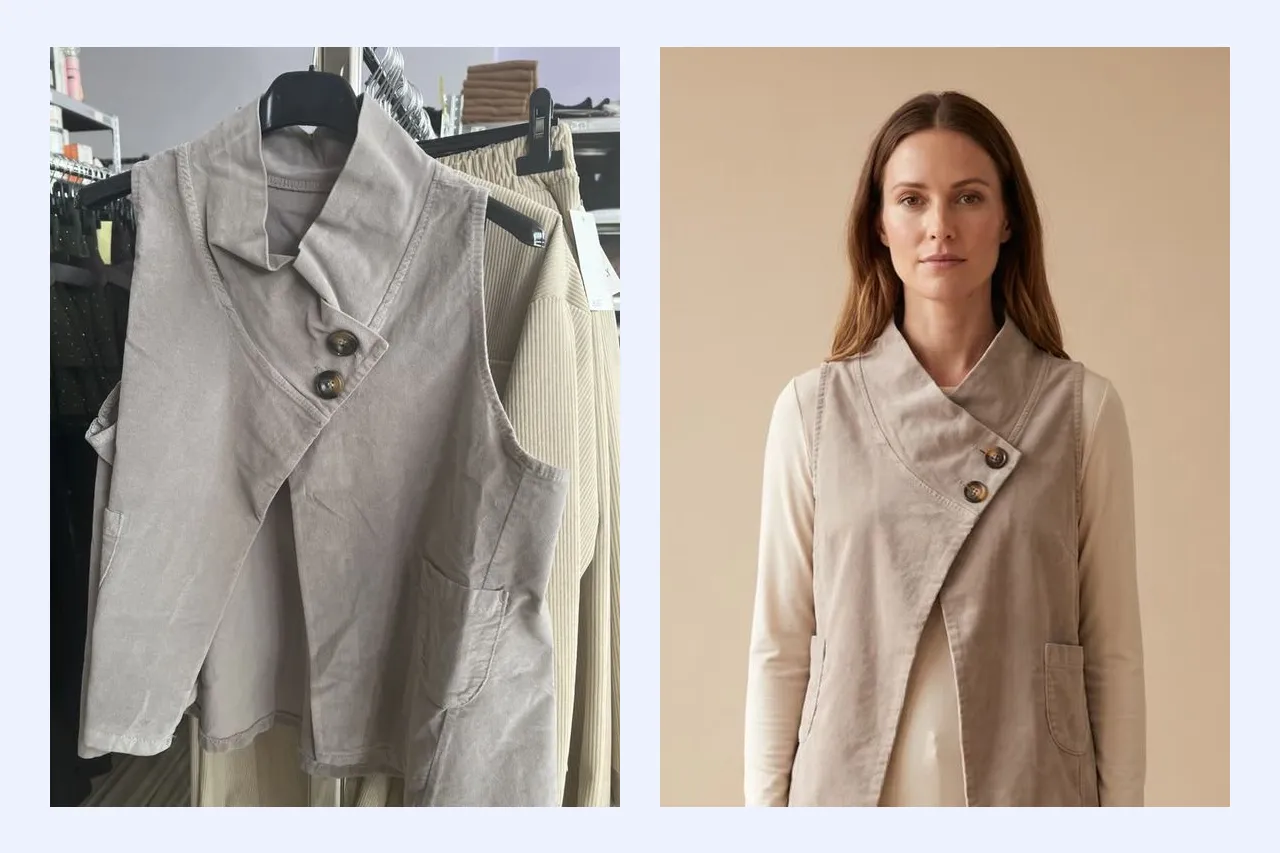
The cover of this article shows a real example: on the left, a vest photographed on a hanger in a shop; on the right, the model shot made from that single photo.
The rule that matters: the product must stay the product
AI is good at making things look nice. That is also the risk. If the AI image shows a different color, a longer sleeve or a pocket that isn't there, it is misleading advertising — and the item will come back as a return.
So treat AI photos like a photographer's proofs and check every image against the real item before it goes into your shop. A good tool helps by sticking closely to the details of your original and by never publishing anything without your approval.
For the best results, start with a good source photo:
- the whole garment in the frame, in daylight
- no folds hiding buttons, prints or pockets
- labels on cosmetics and packaging facing the camera
- a separate photo of the back if you want an accurate view from behind
Your own model, from your own photo
Customers trust a face they recognize. For many shops, that face is the owner, who wears the collection herself and whom people know from Instagram; for a bigger brand, it might be the founder or a familiar face from the team. With AI, that face can appear in every product photo.
All it takes is 1 to 3 ordinary photos of one person with the face clearly visible. A studio portrait is made from them, and that portrait becomes the face of every model shot, pose and video in the collection.
Two rules are non-negotiable. The photos must show you, or someone aged 18 or over who has given you written consent to use their likeness — never children, never anyone who hasn't agreed. In Streamo, that consent is recorded when the model is created, and the source photos are deleted as soon as the portrait is ready.
If you would rather not use a real person, ready-made models do the same job. What matters is using the same model across the whole collection, so it looks like one shoot rather than ten different ones.
AI labels: what the EU now requires
Since 2 August 2026, the transparency rules of the EU AI Act (Article 50) have applied. Put simply: if you publish an image or video that was generated or significantly altered by AI and could pass for real, you have to say so — visibly, where the shopper first sees it, not hidden in the terms and conditions. The obligation lies with whoever publishes the image, which means the shop, not the AI tool.
In practice that means a short label such as "AI content" on the photo, in your shop and in your social posts. Streamo adds it automatically to images and videos from its AI Photoshoot, both in your e-shop and when you post them to Facebook and Instagram. A plain cut-out of your own photo on a white background doesn't need one.
What it costs
Instead of a budget for a photoshoot every month, you pay per image or video with prepaid credits, and you see the exact price before you generate anything. Failed attempts are refunded automatically, and the credits don't expire.
How to start
In Streamo, open AI Photoshoot, switch it on and pick a product with its photo. Then choose what you want: a model shot, a packshot, a scene or a video. The good results go into the product's gallery with one click, or straight into a post for Facebook and Instagram.